BasicFileInfo stream
To easily extract this information from Revit models, see Get Revit Model Information and Extracting Revit File Info
Stream Format
The metadata about a file is stored in the BasicFileInfo stream. Over the years, TheBuildingCoder has written many (This, This, This, and This to link a few) articles on how to extract info from this stream.
The BasicFileInfo is a UTF-16 Little-Endian text file and is formatted (as of Revit 2019.2) as shown here:
Worksharing: Not enabled
Username:
Central Model Path:
Format: 2019
Build: 20180806_1515(x64)
Last Save Path: C:\Users\eirannejad\Desktop\Project1.rvt
Open Workset Default: 3
Project Spark File: 0
Central Model Identity: 00000000-0000-0000-0000-000000000000
Locale when saved: ENU
All Local Changes Saved To Central: 0
Central model's version number corresponding to the last reload latest: 4
Central model's episode GUID corresponding to the last reload latest: 2ecc6fa1-2960-4473-9fd9-0abce22022fc
Unique Document GUID: 2ecc6fa1-2960-4473-9fd9-0abce22022fc
Unique Document Increments: 4
Model Identity: 00000000-0000-0000-0000-000000000000
IsSingleUserCloudModel: False
Author: Autodesk Revit
These are the changes to this format in 2019 going forward so watch for them if you’re reading older Revit files:
# added
Format: 2019
IsSingleUserCloudModel: False
Author: Autodesk Revit

# modified
Revit Build: Autodesk Revit 2016 (Build: 20161004_0715(x64)) --> Build: 20180806_1515(x64)
Extracting the Stream
This UTF-16 stream (every two bytes represents one character) is usually stored after an ASCII stream (each single byte is a character).
Both these streams are written with Windows-Style line-ending (\r\n with hex codes 0x0D 0x0A read Carriage-Return/Line-Feed). An ASCII line ending (0x0D 0x0A vs 0x0D 0x00 0x0A 0x00 in UTF-16) separates these two sections:
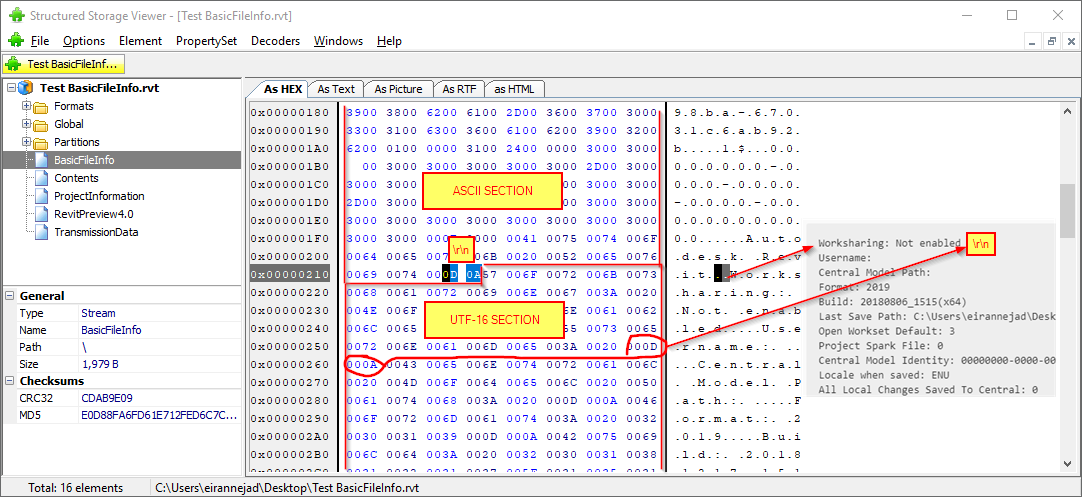
So the stream needs to be read in binary, split by 0x0D 0x0A bytes, and the last section be converted into the UTF-16 format:
... 0x00 0x76 0x00 0x69 0x00 0x74 0x00      # ASCII stream split by: 0x0D 0x0A # End of ASCII stream
0x57 0x00 0x6F 0x00 0x72 0x00 0x6B...       # UTF-16 stream
... 0x0D 0x00 0x0A 0x00                     # End of UTF-16 stream
In addition, the string representation of boolean values are written in ASCII again inside this UTF-16 stream. So a binary search and replace is necessary.
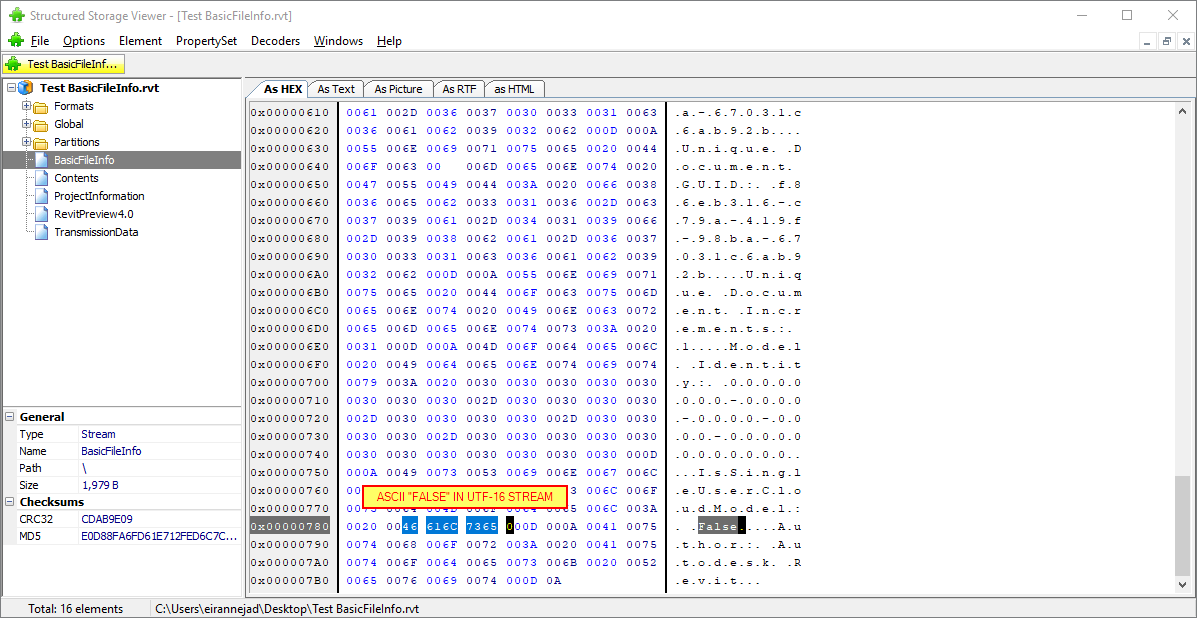
Here is a snippet from pyRevitLabs that performs this search and replace:
using pyRevitLabs.Common;

// replace False with UTF-16 LE False
utf16Stream = CommonUtils.ReplaceBytes(
    extractedStream,
    //           F     a     l     s     e     null
    new byte[] { 0x46, 0x61, 0x6C, 0x73, 0x65, 0x00 },
    //           F           a           l           s           e
    new byte[] { 0x46, 0x00, 0x61, 0x00, 0x6C, 0x00, 0x73, 0x00, 0x65, 0x00}
    );
Now the BasicFileInfo stream is cleaned up and ready to be converted to UTF-16: