ProjectInformation stream
To easily extract this information from Revit models, see Get Revit Model Information and Extracting Revit File Info
Stream Format
The ProjectInformation contains the Project Information data and custom project parameters.
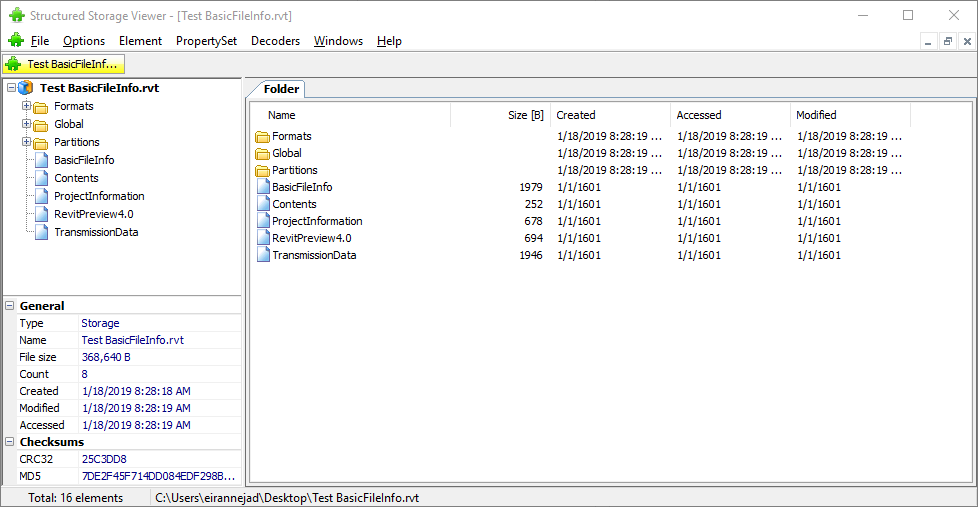
The stream is a blob of pk-zip archive. We can save this stream using SSView to a separate file and open it with 7zip. You will find a single xml file inside this archive when extracted.

Let’s peek into this xml file. The structure is very similar to the PartAtom stream discussed in the previous article:
<?xml version="1.0" encoding="UTF-8"?>
<entry xmlns="http://www.w3.org/2005/Atom" xmlns:A="urn:schemas-autodesk-com:partatom">
    <title>Project1</title>
    <updated>2019-06-30T11:52:15Z</updated>
    <A:taxonomy>
        <term>adsk:revit</term><label>Autodesk Revit</label>
    </A:taxonomy>
    <A:taxonomy>
        <term>adsk:revit:grouping</term><label>Autodesk Revit Grouping</label>
    </A:taxonomy>
    <link rel="design-2d" type="application/rvt" href=".">
    <A:design-file>
        <A:title>Project1.rvt</A:title>
        <A:product>Revit</A:product>
        <A:product-version>2019</A:product-version>
        <A:updated>2019-06-30T11:52:15Z</A:updated>
    </A:design-file>
    </link>
    <A:features>
        <A:feature>
            <A:title>Project Information</A:title>
            <A:group>
                <A:title>Text</A:title>
                <Custom_Project_Parameter displayName="Custom Project Parameter" type="custom" typeOfParameter="Text">
                    Custom Value</Custom_Project_Parameter>
            </A:group>
            <A:group>
                <A:title>Identity Data</A:title>
                <Organization_Name displayName="Organization Name" type="system" typeOfParameter="Text">Value
                </Organization_Name>
                <Organization_Description displayName="Organization Description" type="system" typeOfParameter="Text">
                    Value</Organization_Description>
                <Building_Name displayName="Building Name" type="system" typeOfParameter="Text">Value</Building_Name>
                <Author type="system" typeOfParameter="Text">Value</Author>
            </A:group>
            <A:group>
                <A:title>Energy Analysis</A:title>
            </A:group>
            <A:group>
                <A:title>Other</A:title>
                <Project_Issue_Date displayName="Project Issue Date" type="system" typeOfParameter="Text">Value
                </Project_Issue_Date>
                <Project_Status displayName="Project Status" type="system" typeOfParameter="Text">Value</Project_Status>
                <Client_Name displayName="Client Name" type="system" typeOfParameter="Text">Value</Client_Name>
                <Project_Address displayName="Project Address" type="system" typeOfParameter="Multiline Text">Multiline
                    Value
                    Multiline Value
                    Multiline Value</Project_Address>
                <Project_Name displayName="Project Name" type="system" typeOfParameter="Text">Value</Project_Name>
                <Project_Number displayName="Project Number" type="system" typeOfParameter="Text">Value</Project_Number>
            </A:group>
        </A:feature>
    </A:features>
</entry>
Notice that the project information key:values are grouped, similar to how the are grouped in Revit user interface:
Inside each group, there are one or more custom xml elements that correspond to the project information parameter:
<Organization_Description displayName="Organization Description" type="system" typeOfParameter="Text">
    Value
</Organization_Description>
To be honest I do not know why these elements have custom names e.g. Organization_Description. But the actual pretty name of the parameter is set on the displayName attribute. The value, per xml standard, is the inner text of the element and could be multi-line as well:
<Project_Address displayName="Project Address" type="system" typeOfParameter="Multiline Text">
    Multiline Value
    Multiline Value
    Multiline Value
</Project_Address>
Extracting Info
We can automate this process in code. These excerpts are from the pyRevitLabs code library that supports pyRevit and pyRevit CLI
// extract ProjectInformation (Revit Project Files)
// ProjectInformation is a PK Zip stream
var rawProjectInformationData = CommonUtils.GetStructuredStorageStream(FilePath, "ProjectInformation");

Stream zipData = new MemoryStream(rawProjectInformationData);
var zipFile = new ZipArchive(zipData);
foreach (var entry in zipFile.Entries) {
    if (entry.FullName.ToLower().EndsWith(".project.xml")) {
        using (Stream projectInfoXamlData = entry.Open()) {
            var projectInfoXmlData = new StreamReader(projectInfoXamlData).ReadToEnd();
            ProcessProjectInfo(projectInfoXmlData);
        }
    }
}
// parse the xml file and extract the data into a dictionary of key, values
var doc = new XmlDocument();

doc.LoadXml(rawProjectInfoData);
XmlNamespaceManager nsmgr = new XmlNamespaceManager(doc.NameTable);
nsmgr.AddNamespace("rfa", @"http://www.w3.org/2005/Atom");
nsmgr.AddNamespace("A", @"urn:schemas-autodesk-com:partatom");

// extract project parameters
var projectInfoDict = new Dictionary<string, string>();
XmlNodeList propertyGroups = doc.SelectNodes("//rfa:entry/A:features/A:feature/A:group", nsmgr);
foreach(XmlElement properyGroup in propertyGroups) {
    foreach(XmlElement child in properyGroup.ChildNodes) {
        if (child.HasAttribute("displayName")) {
            string propertyName = child.GetAttribute("displayName");
            string propertyValue = child.InnerText;
            projectInfoDict.Add(propertyName, propertyValue);
        }
    }
}